Showing posts with label Little Tricks that make life easier. Show all posts

Thursday, April 22, 2010

All you need to know about renewing passport at Malaysia High Commission of Singapore

Disclaimer : all info correct as of 22nd April 2010, please verify them if necessary.

Location & Contact Details :
http://www.kln.gov.my/web/sgp_singapore/home
As of end of March 2010, they will only receive new passport application from Monday to Thursday (220 per day) and all passport will be ready for collection on Friday.

Things to prepare:
1. 2 blue background color photos (3.5cm x 5cm, passport size)
2. Original Malaysian IC and 1 photocopy of it (front and back)
3. Original SPR IC/student pass/employment pass etc. and 1 photocopy of it(front and back)
4. Completed IM42 form (can be collected at guard house for free or download online from IMI website. Please print this form in one sheet of paper as they don’t accept 2 sheet of papers.)
5. Cash SGD128 (subjected to change)
6. Your current passport (well, do I need to mention this?)

How to go (Map) :  
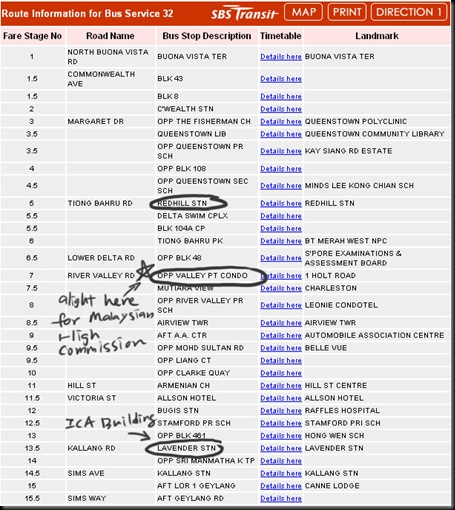
Take bus no. 32 from Redhill MRT station(or bus no 14 / 65 from orchard MRT) and alight at the bus stop opposite valley pt condo.(You can press the bell after you saw the Esso petrol station on your left hand side for bus no. 32) then walk along Jervios road (the road in between Esso and SPC petrol station) to reach Malaysia High Commission of Singapore.

If you plan to transfer your re-entry permit (REP) at ICA building personally, you can board bus no. 32 at the bus stop opposite valley pt condo too. However, you can actually transfer your REP to new passport via the online eServices from http://www.ica.gov.sg/

Some images for easier navigation :
Bus
Malaysia High Commission of Singapore MapIMG_4377


Application Procedure :
1. Get a pass from the Guard house.

Things to take note : 
      a. they need one of your photo ID or credit card to exchange for a pass, please don’t give them your IC as you’ll need it later, give them your driving license etc. 
      b. Please don’t join the queue blindly as normally they’ll be two queues, one for getting pass at guard house another queuing to go in the high commission after you got your pass.

2. Queue at the side door and wait for security check to go in the high com.

3. Get all your forms ready and remember to stick your photos in the form, they will check before issue you a queue number. (special counter available for senior citizen and pregnant women)

4. After got your queue number, wait for your turn for submission of new passport application.

5. After submission, pay at the payment counter and they will tell you what time to go for collection on Friday. Voila, that’s it!

p/s : photocopy and self service photo taking available on the spot but it’s advisable get all your documents ready before you go to avoid long queue.


Things to take note for fill out the IM42 form:

Please fill out accordingly and take note of the following…

Page 1 : You only need to fill out your Singapore address in the “Alamat Semasa” section and remember to stick your photo and write your mobile number at the bottom part.

form pg1

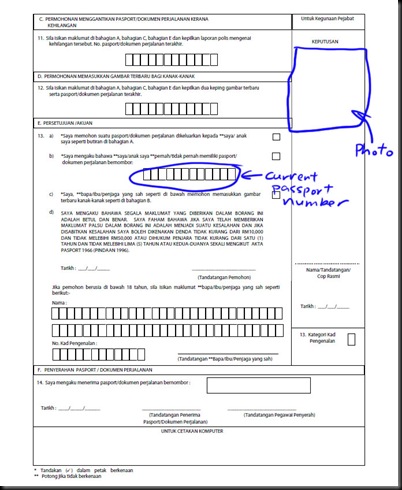
Page 2 : Remember to stick your photo and fill out current passport number.form pg2 

References :

http://tingwo.blogspot.com/2008/12/renew-passport-at-high-commission-of.html

As I had benefited a lot from others blog post so I think it’s good to write an updated version. Please feel free to copy and rewrite this post to a better one. Cheers!

Saturday, April 17, 2010

say bye bye to tap input and say hello to gesture based text input from SlideIT , Swype , Shapewriter….

After I tried the gesture based data entry from SlideIT myself using my Windows Mobile(WM) phone yesterday. I’m quite convinced that tap typing input in mobile device(or smaller screen device) will soon be phased out. (well, at least for smart phone)

Initially, I really wanted to try Swype but it wasn’t available for every WM phone due to their business model(To my understanding , more incline to B-B instead of B-C). That’s completely alright for me so I try SlideIT which generally provide more or less the same thing.

Anyone who ever use WM will know that the basic input method provided from MS really leave a large room for developer to do something. Text input is generally a painful experience, so I’ll try to write as short as possible in my SMS. However, things change after I install slideIT. 

Simply put, it’s fast, it’s easy to learn, it’s cool. Using some sort of history term, you really can divide the “text input timeline” using BC and AD.

Some demo videos done by others from youtube:

SlideIT:


Swype:


Shapewriter:


All of these 3 input method are actually protected by some sort of “patent” thing but I’m not going to dig into that since it’s going to be a long debate. If you’re interested you can visit here instead.

Wednesday, November 25, 2009

Thing i do after Xperia X1 back from service center..and..why it goes to service center so often..

x1-review-x-2 Install touch response (your device will vibrate once it sense a touch on screen) : http://www.freewarepocketpc.net/ppc-download-touchresponse.html

Install SPB Mobile shell 3.5(for your finger to browse all the program in start menu) :  http://www.spbsoftwarehouse.com/products/mobileshell/

Disable SMS sent bubble(for faster response after sms sent, it’s a useless notification anyway) : http://www.mydigitallife.info/2008/06/24/enable-or-disable-the-sms-text-message-sent-notification-bubble/

Install CE star (for Chinese input and decode chinese character when browsing website) : http://www.mobem.com/products/CE-Star.php

Sync device back with Outlook so that all contacts and calendar will be back in place.

Install RAR for pocket pc(for extract zip file) : http://www.win-rar.com/download.html

As X1 comes with Opera Mobile browser , else it should also be included in the installation list : http://www.opera.com/mobile/

Install Flash lite 3.1(for flash website) and batti(for a better battery usage indicator) : http://www.modaco.com/content/xperia-x1-x1-modaco-com/274005/pauls-must-have-free-xperia-x1-software/

Diamond keyboards(for your finger and completely ditch stylus) :
http://forum.xda-developers.com/showthread.php?t=426281


Judging from the long list above, it looks like there are still lots of thing Sony Ericsson can do to perfect the overall experience and make a customer happier. (software wise)

For Hardware wise there is only one complaint and it’s a serious one for the QWERTY keyboard :
I SERIOUSLY THINK THAT THE MATERIAL USE TO SUPPORT THE PHYSHYCAL KEYPAD WASN’T UP TO THE STANDARD AND IT’S OBVIOUSLY A DESIGN FLAW.

I sent back my X1 twice within one year to repair the QWERTY key pad. Generally, some of the keypad will start to show symptom within 3 months and others will follow.

Common symptoms are :
1. Once you pressed the button, but the character did not appear on screen .
2. You pressed the button once, but it appear 2 or 3 character on screen .
3. The soft-keypad will start to wear out from commonly used characters , for example space bar, dot(. ), and question mark(?), and other characters will also slowly develop the symptom described in point two and three.
4. The soft-keypad will start to wear out after few months of under normal usage. (i swear I’m not an avid SMSer..)


Guess what , if your device is out of warranty , it will cost you SGD80 to replace the support material without adding in the labour charge yet.

Wednesday, July 22, 2009

How to sync your Twitter update to Facebook , Live Messeger(MSN) and GoogleTalk

My Live messenger(MSN) personal message and Gtalk custom message section hasn’t been update for very long time since it’s not very convenient to update everything one by one… so that’s why I go and search for the solution to keep everything in sync.

Here is a simple solution for Twitter user. What you need to do is just update your twitter status and everything else will keep in sync. twitter in sync

To keep Twitter in sync with Facebook status and Live messenger(MSN) , please visit Inerd Hussien site.  However please take note that, you need to refer to this website and use the trick there to replace step no. 3 in the “ Integreating Facebook Status with Windows Live Messenger Personal Message section” from the Inerd Hussein site.

To keep Twitter in sync with Gtalk custom message, you need Twitter2talk. ( update will take longer time). You only need to click the Log In link at the right upper corner and login using your google account and then click the setting link and key in your Gtalk detail and check the “Active” checkbox and click submit, everything else will be taken care of.

To keep your experience even more pleasurable with easier update on twitter, you can consider the following :
1. If you use Firefox, the add-on TwitterFox is very nice.
2. If you staying in Singapore/ Malaysia, you can update Twitter via SMS from the service provided by SMSYO.